This is why I run librewolf. I don’t know if I’d call it a real solution because it’s maintained by a tiny team of volunteers who’s job becomes more difficult with every antipattern mozilla builds into the source, but for now I find turning on features to make librewolf work on all my sites preferable to turning off features in firefox.
Then an app you want is distributed as a Docker. If you follow the Docker website on how to install Docker you end up with Docker Desktop which installs- you guessed it: AI.
I never have Docker Desktop on my machines, only Compose, but looking at the documentation they have definitely made it confusing. I know the terminal isn’t for everyone, but it’s straightforward. For easy install (and no AI or GUI) open a terminal and remove existing conflicts: Debian/Ubuntu specific
for pkg in docker.io docker-doc docker-compose docker-compose-v2 podman-docker containerd runc; dosudo apt-get remove $pkg; done
Ah, thanks for the tip! From what I can gather most of my services can run just as well with a minor tweak for GPU CUDA usage. For my case, it might not be a problem but using your method would no doubt be huge for Pi-based servers
The issue is that if you rtfm instead of already know what to do through osmosis, you end up with Docker Desktop which has Docker’s AI built in.
It’s a double standard for Linux users. When MS has something broken like AI pushed into an app that could be avoided by using a different app or a regedit, everyone blames MS. But when Linux has the same problem, everyone blames the user for not knowing that they should ignore the official website documentation and install an alternative like podman or use aptget to avoid docker desktop.
I’d agree except that Microsoft pushing AI into a microsoft program is not the same as a program that runs on Linux (and probably other systems as well) pushing its own ai thing.
that is to say, Microsoft is directly responsible for what they do, but “Linux” is not one monolithic monopoly. the issue here is with docker, which is one of many available choices.
that said, ai is everywhere and needs to go away. i too am tired of it being injected into everything

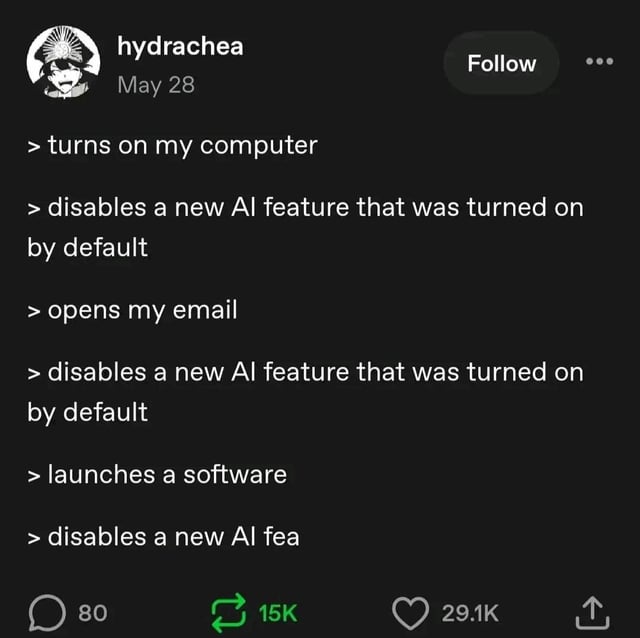
Damn, sorry to hear that you haven’t installed Linux yet.
> opens firefox, the default browser of my new linux distro. finally some common sense default, i think!
> disables new ai feature that was turned on by default
This is why I run librewolf. I don’t know if I’d call it a real solution because it’s maintained by a tiny team of volunteers who’s job becomes more difficult with every antipattern mozilla builds into the source, but for now I find turning on features to make librewolf work on all my sites preferable to turning off features in firefox.
Librewolf is my main browser, but with pesky sites I either need or really like I usually use a locked-down waterfox
Then an app you want is distributed as a Docker. If you follow the Docker website on how to install Docker you end up with Docker Desktop which installs- you guessed it: AI.
https://podman.io/
i have never seen docker desktop outside of windows. I have been working with docker for pretty much 10 years now.
I never have Docker Desktop on my machines, only Compose, but looking at the documentation they have definitely made it confusing. I know the terminal isn’t for everyone, but it’s straightforward. For easy install (and no AI or GUI) open a terminal and remove existing conflicts:
Debian/Ubuntu specific
for pkg in docker.io docker-doc docker-compose docker-compose-v2 podman-docker containerd runc; do sudo apt-get remove $pkg; doneRHEL/CentOS/Fedora/Rocky specific
sudo dnf remove -y docker docker-client docker-client-latest docker-common docker-latest docker-latest-logrotate docker-logrotate docker-engine podman runcThen install:
Arch specific
sudo pacman -S docker-composeAlpine specific
All others
If you only care about running containers, containerd and nerdctl should be sufficient.
Ah, thanks for the tip! From what I can gather most of my services can run just as well with a minor tweak for GPU CUDA usage. For my case, it might not be a problem but using your method would no doubt be huge for Pi-based servers
sudo apt-get install docker
Sorry to say this but: if an app that you want is distributed as docker, then that’s a “you” problem for wanting it anyways. Avoid shit software.
The various Linux containers I run on my Linux server seem to be giving me a different experience to you
The issue is that if you rtfm instead of already know what to do through osmosis, you end up with Docker Desktop which has Docker’s AI built in.
It’s a double standard for Linux users. When MS has something broken like AI pushed into an app that could be avoided by using a different app or a regedit, everyone blames MS. But when Linux has the same problem, everyone blames the user for not knowing that they should ignore the official website documentation and install an alternative like podman or use aptget to avoid docker desktop.
I’d agree except that Microsoft pushing AI into a microsoft program is not the same as a program that runs on Linux (and probably other systems as well) pushing its own ai thing.
that is to say, Microsoft is directly responsible for what they do, but “Linux” is not one monolithic monopoly. the issue here is with docker, which is one of many available choices.
that said, ai is everywhere and needs to go away. i too am tired of it being injected into everything